Themes
This page will be most useful for users who are familiar with GraphQL Concepts and understand the basics of writing GraphQL Queries.
Querying Themes
WPGraphQL provides support for querying Themes in various ways.
List of Themes
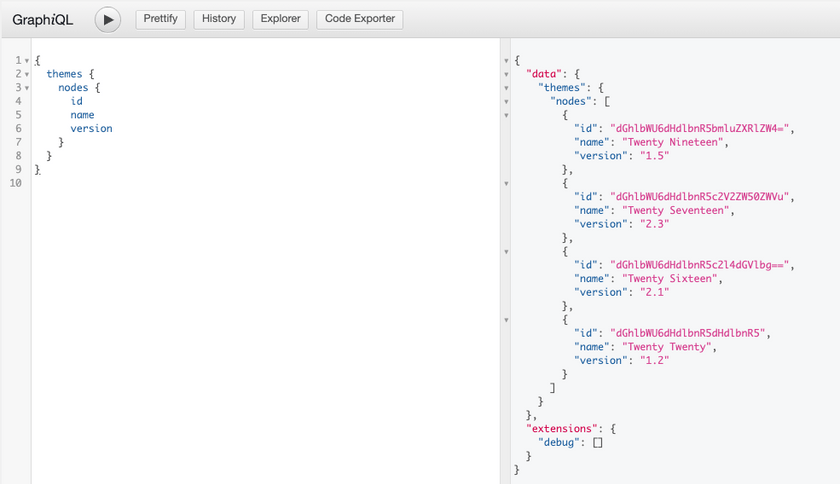
Below is an example of querying a list of Themes.
{
  themes {
    nodes {
      id
      name
      version
    }
  }
}
Query from Authenticated User
Authenticated users with the “edit_themes” capability can query a list of Themes and see all available themes for the site.
Query from Public User
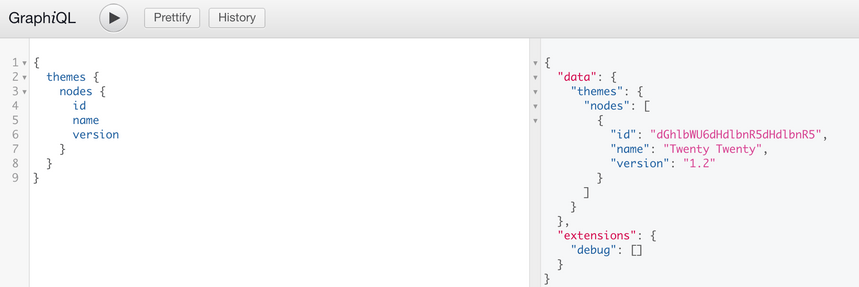
A public user or a user without “edit_themes” capability can make the same query and only the active theme will be returned.
The active theme is considered a public entity in WordPress and can be publicly accessed and WPGraphQL respects this access control right.
Content Templates
WPGraphQL exposes page templates assigned to content through the template field on content types that implement the NodeWithTemplate interface.
Querying Templates
{
  pages {
    nodes {
      title
      template {
        templateName
      }
    }
  }
}
For a page using the default template, this returns:
{
  "data": {
    "pages": {
      "nodes": [
        {
          "title": "Sample Page",
          "template": {
            "templateName": "Default"
          }
        }
      ]
    }
  }
}
Classic Themes vs Block Themes
WordPress supports two types of themes, and template behavior differs between them:
Classic Themes (e.g., Twenty Twenty-One)
Classic themes use PHP template files placed in the theme directory. These templates:
- Are PHP files with a
Template Nameheader comment - Are recognized by WordPress via
get_page_templates() - Appear in WPGraphQL as distinct
ContentTemplatetypes
Example PHP template file (my-template.php):
<?php
/**
 * Template Name: My Custom Template
 */
When this template is assigned to a page, WPGraphQL exposes it:
{
  page(id: "example-page", idType: URI) {
    template {
      __typename      # Returns "MyCustomTemplate"
      templateName    # Returns "My Custom Template"
    }
  }
}
Block Themes (e.g., Twenty Twenty-Five)
Block themes (also called Full Site Editing or FSE themes) use a different template system:
- Templates are HTML files with block markup in the
templates/directory - Template registration is handled via
theme.json - PHP template files in the theme root are not recognized as page templates
Important: If you’re using a block theme and place a PHP template file in your theme directory, WordPress will not recognize it as a page template. This is WordPress core behavior, not a WPGraphQL limitation.
Template Type Names
WPGraphQL generates GraphQL type names from template names by:
- Removing special characters
- Converting to PascalCase
- Prefixing with
Template_if the name starts with a number or contains only non-ASCII characters
| Template Name | GraphQL Type |
|---|---|
| Default | DefaultTemplate |
| My Custom Template | MyCustomTemplate |
| Full Width | FullWidthTemplate |
| 2 Column Layout | Template_2ColumnLayout |
Introspecting Available Templates
You can query the schema to see all registered template types:
{
  __type(name: "ContentTemplate") {
    possibleTypes {
      name
    }
  }
}
Mutations
WPGraphQL does not currently support mutations for themes.